


 8 minute read
 Peripherals
 9 chapters
There is no single best mouse for every VALORANT player. Use the tool below to find the right fit for your hand, or browse our top picks.
MEASURE YOUR HAND AND WE’LL FIND THE RIGHT MOUSE SIZE
Measure your hand from the wrist crease to the tip of the middle finger, then the width at the knuckles. Length is the main criterion. Enter it in centimeters or in inches, whichever your tape measure uses, and the tool converts its recommendations to match.
Find the right mouse size
Enter your hand length and your gripAffiliate links. Buying through them supports I Love Valorant, at no extra cost to you.
In some games the mouse is your main lever of control, far more than the keyboard, and that is the case in FPS and MOBAs. A mouse that suits the player is a genuine asset.
WHAT THE PRO SCENE TELLS US
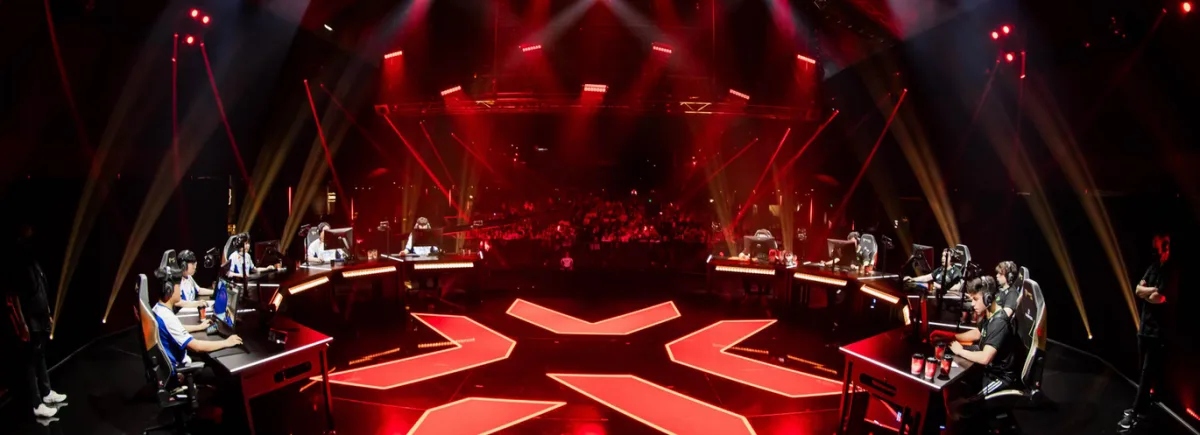
Looking at the gear professional Valorant players use is instructive, as long as you read it as a direction of travel rather than a shopping list. What follows is the state of the scene in August 2026, and it moves.
Wireless has won. In 2021 most of the scene was still playing wired. Today more than 95% of professional players are wireless: the latency of a dedicated 2.4 GHz dongle is a settled question, and nobody argues about it anymore. Zekken, at Sentinels, plays on a Razer Viper V4 Pro.
Weight keeps falling. The average mouse on the scene is now under 55 grams, and the floor is still moving. Tacolilla, at LOUD, plays on a Lamzu Maya X at 47 grams. That brand went from nothing to 6.72% of professional players in two years, which tells you how fast this segment turns over.
Shapes have converged on symmetrical. Ambidextrous shells dominate, and the ergonomic category still exists but it is now the exception. aspas, at LOUD, plays on a symmetrical G PRO X Superlight 2. On the other side, pANcada kept an ergonomic DeathAdder V4 Pro, a shape only 41 professional players still use.
What you should not do is copy their DPI settings without understanding what they mean. A professional built their muscle memory over thousands of hours with their setup. To work out where you stand next to them, read our guide to sensitivity, which lists the eDPI of several players on the scene.
OUR PICK OF THE BEST MICE FOR VALORANT AND OTHER FPS
WHICH GAMING MOUSE FOR VALORANT AND OTHER FPS?
By gaming mouse we mean a mouse built for games: it can change its DPI and it usually has two side buttons or more. DPI (dots per inch) is the number of dots the sensor registers over one inch of movement, which translates into the speed of your cursor. The higher the DPI, the faster the cursor.
Gaming mice have gone mainstream over the last few years and choosing one keeps getting harder. So here is how to pick a mouse for playing Valorant.
THE CRITERIA FOR CHOOSING AN FPS MOUSE
There are three main ones. RGB is not among them, it is decoration, and your goal is to land precise shots and win. There is unfortunately less choice for left-handed players, who are around 10 % of the population, even if some very good ambidextrous mice exist.
Broadly speaking, every mouse from a known brand ships with software to manage buttons and macros.
The shape of the mouse
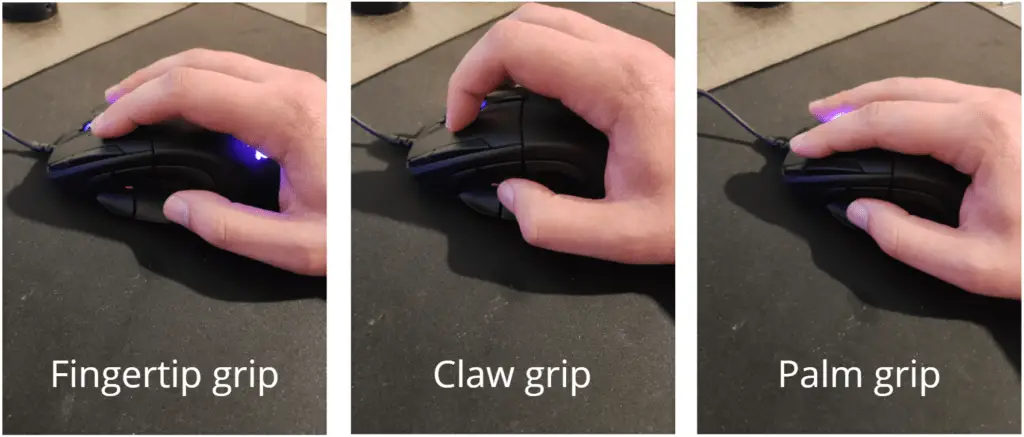
Only the fingers touch the mouse. It is the most precise grip on small movements, but it calls for a very light mouse.
The fingers are arched and only the base of the palm touches the mouse. A good compromise between stability and speed, very common in competitive play.
The palm rests fully on the mouse. It is the most stable and the least tiring grip, but also the least agile for micro-adjustments.
You generally want a mouse that gives you plenty of freedom of movement while staying precise. Large MMO mice, thick with a wall of side buttons, are best avoided.
Mouse size: you will have to adapt to your hand size and your grip. Try the mouse in a store when you can. Failing that, compare the length and width in the spec sheet against the mouse you already use. A large mouse on a small hand costs you effectiveness.
Mouse weight: weight is decisive. Not too heavy, not too light, so that you can keep going through long sessions. How it feels to you counts too, of course.
Sensor and DPI steps
Optical sensor: the laser versus optical debate belongs to the past now. Every serious gaming mouse runs an optical sensor, laser having gradually disappeared from the gaming segment. The question is no longer the technology but which sensor is on board: recent PixArt parts sit in the great majority of the good mice on the market today.
DPI steps: every user finds their own DPI value (sensitivity), and to fine-tune it some mice only offer steps of 200, which leaves you little room. Others only offer preset values, which is worse. Favor mice that offer steps of 50 or 100 DPI.
Maximum DPI: in reality, nearly every competitive player sits between 400 and 1600 DPI, with 800 DPI as the most widespread reference value and 1600 DPI just behind. What counts is not DPI on its own but eDPI, your DPI multiplied by the sensitivity set in the game, explained in detail in our guide to finding your sensitivity. A very high maximum therefore brings nothing in practice, but it stays a useful signal: a mouse advertising a 20,000 DPI sensor or more usually carries a recent, reliable part.
Extra buttons
Two or three side buttons are generally enough, but do not forget the tilt on the scroll wheel, which can add two more functions. Some mice also have two DPI buttons that can be reassigned to something else.
WEIGHT AND SIZE, THE TWO DECISIVE CRITERIA
These are the two points where a mistake costs you straight away, and the two that have moved the most in recent years. A mouse that is too heavy tires your arm over long sessions and slows your corrections; a mouse too large for your hand forces you to compensate constantly.
The weight markers
Gaming mouse weight has fallen dramatically since 2020, driven by professional tactical FPS players. Here are the current categories.
Weight categories and the profiles they suit.
| Category | Weight | Who for |
|---|---|---|
| Ultra-light | Under 60 g | Low sensitivity, arm aiming, fingertip grip. The current competitive standard. |
| Light | 60 to 75 g | The best compromise for most players, whatever the grip. |
| Standard | 75 to 95 g | Palm grip, and players who like to feel the mouse under the hand. |
| Heavy | Over 95 g | Used less and less in competitive play, but perfectly playable if you prefer them: stability has its followers. |
A word to put those numbers in their place: ultra-light is a high-level optimization, not a requirement for playing well. A regular player does just fine with an 80 or 100 gram mouse, as long as it fits the hand and they have their bearings with it.
 Weight alone does not tell the whole story
A well-balanced 70 g mouse can feel lighter than a 60 g one whose weight sits at the back. Distribution counts as much as the number on the box, and it does not show up on a spec sheet: this is one of the rare cases where you have to try it.
WIRED OR WIRELESS IN 2026?
This is the question that comes up the most, and the answer has changed completely in a few years. Wireless is no longer a compromise: recent models show latency you cannot tell apart from wired, and professional tactical FPS players have moved over en masse.
 Wired
Wired- Cheaper for equal performance
- No battery to manage
- No risk of interference
- The cable creates drag, even with a bungee
- Extra weight from the cable
 Wireless
- Total freedom of movement, a real plus at low sensitivity
- Latency now equal to wired on the good models
- Often the lightest models on the market
- Clearly more expensive
- Battery life to keep an eye on, charging to plan for
 One thing to watch
Do not confuse dedicated wireless, which runs through a proprietary 1000 Hz dongle, with Bluetooth, whose latency is far too high for gaming. A mouse that only advertises Bluetooth is not an FPS mouse.
What about polling rate?
Polling rate is how many times per second the mouse reports its position to the computer. The standard is 1000 Hz, one report per millisecond, and that is plenty. Some recent models offer 4000 or 8000 Hz: the gain is theoretical, measurable in a lab but imperceptible in game for the vast majority of players, and it eats more CPU. Do not pay extra for that spec.
HOW TO CHOOSE YOUR MOUSE FOR VALORANT
 The short answer
You want to combine ergonomics, meaning the mouse that best fits your hand and your grip, with sensor quality, meaning precision and useful DPI steps. Then consider what else the mouse offers, especially extra buttons and customization options.
In order of priority, if your budget is tight: start with size, which has to match your hand, then weight, then sensor quality. Extra buttons, wireless and lighting come afterwards, they are comfort rather than performance.
OTHER CONSIDERATIONS FOR YOUR MOUSE
Recent technologies
Fast technical progress has brought some remarkable new features to gaming mice. Top of the list, wireless has transformed the experience. The latest wireless gaming mice now run with almost no latency at all, matching their wired counterparts and giving players freedom of movement without giving up responsiveness.
Durability and build quality
Beyond performance, durability plays a crucial part in choosing a gaming mouse. Build quality, and the sturdiness of the buttons in particular, matters a great deal. A quality mouse is built to take millions of clicks without showing wear. Favor a mouse whose buttons are made to survive time and heavy use.
Compatibility and firmware updates
Software updates and operating system changes come often, so your mouse has to keep up. Make sure the model you pick is not only compatible with current operating systems, but also that the manufacturer commits to regular firmware updates. Those updates improve performance, keep compatibility and sometimes even add features.
Budget and value for money
Gaming peripherals span a very wide range of prices. A high price does not always guarantee better performance, though. Look for a mouse that offers genuine value: plenty of models on the market combine excellent specs with an affordable price, around $40 to $70, without giving up what matters for Valorant.
The mousepad, the forgotten part of the setup
A mouse is only as good as the surface it glides on. If you play at low sensitivity, a pad at least 40 cm wide, about 16 inches, is essential, otherwise you will run off the surface on every rotation. It is the cheapest peripheral in your setup, and probably the one with the best ratio between price and precision gained.
FREQUENTLY ASKED QUESTIONS
What weight should a gaming mouse be in 2026?
The comfort zone for most players sits between 60 and 75 grams. Below 60 grams you are into ultra-light territory, which is the current standard on the competitive FPS scene. Past 95 grams, mice are used less and less in competitive play, but they remain perfectly playable if that is what you prefer: stability has its followers, and ultra-light is a high-level optimization, not a requirement for playing well.
Wired or wireless for Valorant?
Both work. Modern wireless, as long as it runs through a dedicated dongle and not Bluetooth, gives latency you cannot tell apart from wired. It brings real comfort at low sensitivity, where big arm movements make you feel the drag of the cable. Wired stays clearly cheaper for equal performance, though, and asks nothing of you in battery management.
How many DPI do you need for Valorant?
Set your mouse to 800 DPI, the most widespread reference value, and it suits the vast majority of players. Some prefer 1600 DPI with an in-game sensitivity twice as low, which comes out exactly the same in game. The value that genuinely counts is eDPI, your DPI multiplied by the sensitivity set in Valorant.
What mouse size for my hand size?
Measure your hand from the wrist crease to the tip of the middle finger. Under 17 cm, about 6.7 inches, look for a mouse shorter than 115 mm. Between 17 and 19 cm, roughly 6.7 to 7.5 inches, aim for 116 to 122 mm. Between 19 and 21 cm, 122 to 128 mm. Past 21 cm, about 8.3 inches, look for a mouse longer than 128 mm. Your grip then adjusts that marker: in fingertip take the low end of the bracket, in palm the high end.
Does an 8000 Hz polling rate bring anything?
Not in practice. The 1000 Hz standard already means one transmission per millisecond, far below the threshold of human perception. The 4000 and 8000 Hz steps produce a gain you can measure in a lab but not feel in game, while eating more CPU. It is not a criterion to base a purchase on.
Do left-handed players need an ambidextrous mouse?
Not necessarily, but it is often the smartest choice. The ergonomic mice on the market are built for the right hand and get uncomfortable for a left-handed player. Symmetrical models, very common in the light competitive segment, work perfectly, as long as you check for side buttons on the right side or the option to disable them.