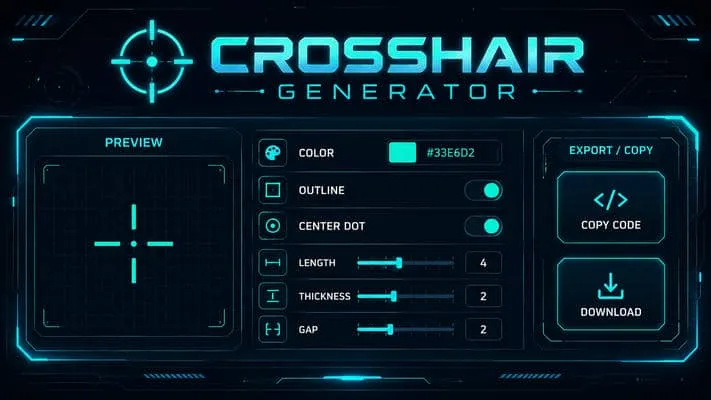
Build your crosshair, test it at real size on an in-game backdrop, then copy the import
code. Pro players' crosshairs are also available, along with a collection of joke
crosshairs.
Import code
ORIGINAL
Paste a code then click Import. The code updates itself whenever you change a setting.
Visibility test: enlarged view, check it in game
Pro codes change often. Check vlr.gg or the player's stream if you want today's version.
These crosshairs are made for laughs, not for climbing. Some completely hide the center of the screen.
Import into VALORANT
Open Settings, Crosshair tab.
Click the arrow next to the profile name, then "Import Profile Code".
Paste the code and confirm. The crosshair applies to the selected profile.
HOW TO IMPORT A CROSSHAIR CODE IN VALORANT
Valorant lets you share any reticle configuration as a text code. It is an official game feature: no external software is involved, so there is no risk for your account.
Copy the code
From the generator above, or from one of the tables below, click the copy button.
Open the game settings
Launch Valorant, open Settings and go to the Crosshair tab.
Import the profile
Click the arrow next to the profile name, then "Import Profile Code".
Paste and confirm
The crosshair applies immediately to the selected profile. You can keep several profiles and switch between them.
EVERY CROSSHAIR SETTING EXPLAINED
The generator exposes every setting the game has. Here is what each one does, and the starting value we recommend for competitive play.
Valorant's crosshair settings and their effect in game.
Setting
Recommended value
Why
Color
Cyan or green
These shades stand out on almost every backdrop in the game. Avoid red, too close to blood and interface elements.
Outlines
On, thickness 1
A black outline keeps the reticle readable on a bright wall as well as in a dark corner.
Center dot
Off
It hides exactly the head you are aiming at. Most pro players do without it.
Inner lines
Length 4, thickness 2
Visible enough to serve as a reference, thin enough to hide nothing.
Offset
2
The empty space in the center is where the enemy's head will appear.
Outer lines
Off
They add no useful information and clutter your field of view.
Movement error
Up to you
Off, the reticle stays stable. On, it blooms when you move and reminds you to stop before shooting.
Firing error
Off
Same logic: a fixed reference is easier to use than a reticle that never stops moving.
The reticle does not aim for you
A good crosshair removes friction, it does not improve your precision. What actually determines it is crosshair placement and your mouse sensitivity. Set your crosshair once, then get back to practice.
WHICH CROSSHAIR SUITS YOUR STYLE
Reticles fall into five broad families. None is better than the others, but they do not suit the same players.
The five main crosshair families and who they suit.
Type
Description
The static crosshair
It never moves, whatever you do. The choice of the vast majority of pro players, because a fixed reference anchors itself faster in visual memory.
The dynamic crosshair
It blooms when you move or shoot, showing your real spread. Useful when starting out, until stopping before shooting becomes a reflex.
The thin crosshair
Short, thin lines, often with a wide central gap. It hides very little, but you need solid placement not to lose track of it.
The thick crosshair
Long or thick lines, sometimes with a center dot. Easier to follow on screen, at the cost of covering part of your field of view.
The dot only
A single dot, no lines at all. Very minimalist and loved by some players, but hard to read on busy backdrops.
PRO PLAYERS' CROSSHAIRS
Here are the codes of 18 pro players and streamers, ready to copy. Load them straight into the generator above to try them, or paste them into the game.
Crosshair codes of Valorant pro players and streamers.
Pro codes change often. Check vlr.gg or the player's stream if you want today's version. And remember a crosshair is calibrated for its owner's sensitivity and resolution: take it as a starting point, not as gospel.
THE TROLL CROSSHAIRS
A collection of 20 joke crosshairs to load between matches. They are made for laughs, not for climbing: some completely cover the center of the screen.
Open the game settings, go to the Crosshair tab, then click the arrow next to the profile name and choose "Import Profile Code". Paste the code and confirm: the crosshair applies immediately to the selected profile. You can keep several profiles and switch between them in game.
Is a crosshair generator allowed by Riot?
Yes, without any reservation. Crosshair codes are an official game feature, designed by Riot Games to share settings. This generator only produces a code you then paste into the game: it does not interact with Valorant and installs nothing on your machine.
What is the best crosshair for Valorant?
There is no single best one, but there are solid guidelines. A thin, static reticle in a bright color with black outlines and a small gap in the center suits the vast majority of players. Beyond that, it comes down to personal comfort: try several setups on the shooting range before settling.
Should you copy a pro player's crosshair?
It is a good starting point, not a magic fix. A pro's crosshair is tuned to their sensitivity, their resolution and their habits. Grab one you like, then adjust the length, thickness and offset to your taste. The crosshair does not aim for you: placement matters infinitely more.
Why does my crosshair change size in game?
Because movement error or firing error is enabled. These options make the reticle bloom when you move or shoot, to visualize your actual spread. You can disable them in the generator as in the game settings to get a perfectly static reticle.
Can you change your crosshair during a match?
Yes. Crosshair settings are available at any time from the menu, including in the middle of a ranked game, and the change applies instantly. It is still ill-advised mid-match: better to lock in your setting during warm-up and stick to it.

 The reticle does not aim for you